PostgreSQL in the browser.
With the features it deserved.

the lightweight self-hosted PostgreSQL web client — extended with keyboard-first navigation, inline data editing, row details sidebar, tabbed queries, vim mode, and more.

$ go install github.com/mohamedelhefni/pgport@latest
View on GitHub See what's new
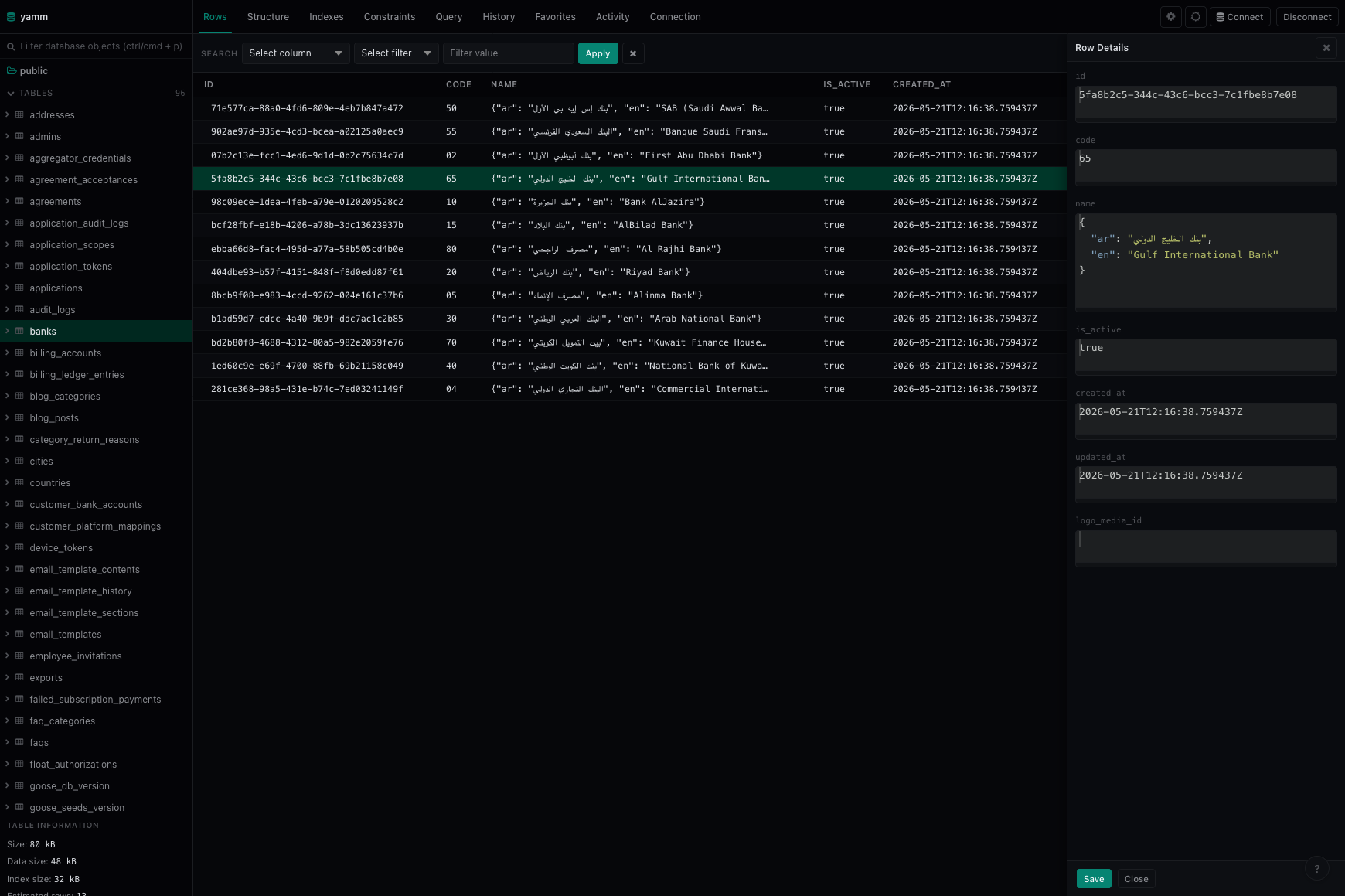
pgport — row details sidebar open on the banks table, showing per-field values with JSON formatting
What's new in pgport

Thirteen additions. Zero new dependencies.

Every feature was built to stay out of the way: keyboard-native, persistent where it matters, and zero setup

Navigation

Command Palette

Hit Cmd/Ctrl+P to open a fuzzy-search finder across every table, view, and function in the connected database. Navigate with arrow keys, select with Enter, dismiss with Escape. No mouse required.

Fuzzy-matches against tables, views, and functions simultaneously
Fully keyboard-driven: arrow keys, Enter, Escape
Opens the selected object in the schema sidebar
TABLE users
TABLE user_sessions
VIEW active_users_v
FN update_user_role()
TABLE audit_log
Editing

Inline Cell Editing

Double-click any cell in browse mode to open an edit modal. A pencil icon flips it into edit mode. Save sends an UPDATE to the server using the row's ctid as the row identifier, with no primary-key assumption required.

Uses PostgreSQL ctid — works on any table, key or no key
View mode and edit mode live in one modal, no separate page
Table row-count refreshes automatically on successful save
id email role status
1 alice@example.com admin active
2 bob@example.com member active
3 carol@example.com admin inactive
4 dave@example.com viewer active
Developer experience

Dark and light theme. Vim mode.

Both themes are built with CSS custom properties throughout — the toggle is instant, no flicker, no page reload. Vim keybindings plug into the Ace editor. Both preferences are persisted in localStorage and restored on next load.

CSS custom properties throughout — every color token is themeable
Vim mode via Ace editor's native vim keybinding module
Theme and vim preference survive page reload and browser restart
Dark
SELECT u.id, u.email
FROM users u
WHERE u.role = 'admin'
ORDER BY u.id DESC
-- NORMAL --
Light
SELECT u.id, u.email
FROM users u
WHERE u.role = 'admin'
ORDER BY u.id DESC
-- NORMAL --
Data Exploration

Row Details. Favorites.

Click any row to open a persistent detail panel on the right. Each field gets its own labeled slot — JSON values render formatted, timestamps stay readable, booleans show clearly. Star any table to pin it to your Favorites list for one-click access.

Non-modal: the panel stays open while you browse other rows
Field values rendered per type: JSON, boolean, timestamp, null
Favorites pinned above the table list in the connection sidebar
id code name active
1 50 SAB Bank true
2 15 AlBilad true
3 80 Al Rajhi true
4 30 Arab Natl true
5 70 Kuwait Fin true
Row Details
id
2
code
15
name
{"en": "AlBilad Bank"}
is_active
true
created_at
2026-05-21T12:16:38Z
logo_media_id
null

Eight more additions

[+ tab]
Query Tabs
Multiple SQL editor tabs in the input panel. Switch between queries without losing work in progress.
[> col]
Expandable Schema
Expand any table in the sidebar to see its columns with name and type shown inline, styled by data type.
{ }
JSON Pretty-Print
JSON column values are automatically formatted when opened in the content modal. No manual parsing.
[+]
Add New Row
A form-based interface for inserting new rows into any table, without writing SQL.
[ace]
Ace Editor Content View
Content modal uses Ace for syntax-highlighted view and edit. SQL formatter and live syntax validation built in.
[⇥ col]
SQL Autocomplete
Table and column name suggestions in the query editor. Completions update when you switch connections.
[≡ db]
Connection Sidebar
A persistent sidebar for switching between open connections. Favorites appear at the top for instant access.
[◷ ⌨]
History & Shortcuts
Fuzzy-search your full query history with Ctrl+H. Open the shortcuts reference with ?.

Smaller by default.

Minimal Docker base image ships nothing but the binary and embedded assets.

[ docker ]
image size
Docker Image
224 MB 25 MB 9× smaller
Switched to a minimal base image. No shell, no extra runtime — just the Go binary and embedded static assets.
$ docker run --rm -p 8081:8081 -it mohamedelhefni/pgport

What's different.

Full feature delta against upstream pgport.

Feature pgport pgport
Query tabs
Command palette
Inline row editing
Add row UI
Row details sidebar
Favorites
Expandable schema browser Basic
JSON formatting Limited
Ace editor content view
SQL formatter + validation
SQL autocomplete (columns)
Connection sidebar
Query history search
Vim mode
Theme persistence
Keyboard-first navigation Limited
Docker image size 224 MB 25 MB